The cheapest way to trust AI document extraction
A vision-language model read 200 real receipts. Simple arithmetic checks decided which results could skip human review, and every receipt they let through had the right total.
The usual question about AI document extraction is “how accurate is it?”. The more useful question is “which results can I use without checking them, and how often are those wrong?” Accuracy averaged over everything does not answer that. A system that is 95% accurate on average is unusable if you cannot tell which 5% are wrong.
I measured this on 200 real receipts from the public CORD-v2 dataset, using an open-weight vision-language model running locally on one GPU. The full setup is on the LAB/002 page. This article is about the one design decision that mattered most.
The idea: let arithmetic decide
Business documents are full of internal consistency. On a receipt, line prices add up to the subtotal, the subtotal plus tax and service equals the total, and cash minus change equals the total. Invoices, purchase orders, bank statements and timesheets have equivalent rules.
So after the model extracts the fields, ordinary code checks those relationships. If every applicable check passes, the result is accepted automatically. If any fails, or if the document has nothing to check, a person looks at it.
What happened
| All receipts | Auto-accepted | Sent to review | |
|---|---|---|---|
| Receipts | 200 | 145 | 55 |
| Fully correct | 65.5% | 80.7% | 25.5% |
| Total correct | 97.4% | 100.0% | 90.6% |
| Line items F1 | 0.88 | 0.94 | 0.76 |
- 72.5% of receipts passed every check and were accepted automatically.
- All of them had the correct total. The model got the total wrong on 5 receipts, and the checks sent all 5 to review.
- Errors concentrate in the review queue. Only a quarter of the receipts sent to review were fully correct, against 81% of those accepted automatically.
The checks cost nothing to run, need no training data and no second model, and anyone who can read the code can see exactly why a document was rejected.
What the model gets wrong is not random
The failures that matter most look perfectly plausible. In this receipt the model put the printed text “10% Tax Included” into the tax field, and turned “50%” (part of a drink name, meaning half sugar) into a discount:
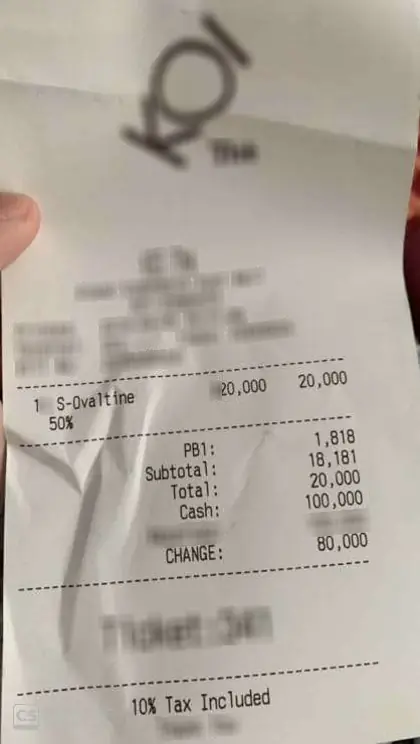
| Field | Model output | Ground truth |
|---|---|---|
| subtotal | 18,181 | 18,181 |
| tax | 10% Tax Included | 1,818 |
| discount | 50% | — |
| total | 20,000 | 20,000 |
| cash | 100,000 | 100,000 |
| change | 80,000 | 80,000 |
| items | S-Ovaltine: 20,000 | |
- Failed: sum of line prices = subtotal (or total if no subtotal)
- Failed: subtotal + tax + service − |discount| = total
- Passed: cash − change = total
The output was valid JSON with reasonable-looking values. A person skimming it would likely approve it. The arithmetic did not.
What the checks cannot see
Validation catches errors that break a relationship. It is blind to errors that don’t. Of the 145 receipts accepted automatically, 28 still had some mistake. 23 of those were line items: a slightly misread product name, or two lines merged with their prices still summing correctly.
So the design question becomes field by field:
- Amounts with arithmetic relationships can usually be automated safely.
- Names, descriptions and codes need a different check, such as a lookup against your product catalogue, supplier list or chart of accounts. Or they need review if they matter downstream.
- Fields with no relationship to anything (a free-text note, a reference number) can only be checked by a person or by a source system.
The checks are imperfect too
Real documents break their own rules. Measured on the correct labels, the receipt checks held only 91–94% of the time: rounding, unlabelled fees, or amounts printed in a way the rule does not expect. With these rules, even a perfect extractor would be auto-accepted on about 82% of receipts.
That is a business decision, not a model property. A looser rule (allow a difference of one unit, say) automates more and lets more errors through. Where to set it depends on what an error costs you, and it should be visible in code, not buried in a model’s confidence score.
How to apply this
- List the relationships in your documents before choosing a model. Totals, dates in order, quantities times unit prices, IDs that must exist in your systems.
- Extract into a fixed schema so those checks can run.
- Route on the checks, and measure accuracy separately for what is automated and what is reviewed.
- Add lookups for fields arithmetic cannot verify.
- Measure the checks against correct data, so you know how much automation they leave on the table.
The model does the reading. Plain code decides how far to trust it.